Definitions, derivations, notes, and long tables start folded.
Chapter 2How a Splash is built
Nobody places Splashery's splats by hand. Most Splashes are recipes: short programs that describe a Splash with a kit of shapes, and the kit fills them with splats when you open the Splash. A recipe is a few kilobytes of code instead of megabytes of splats, and because every random choice comes from a seed, it builds the same splats with the same seed, options, and budget.
The kit is Splashery's Splash-building library. A recipe names shapes, colors, and moving parts; the kit fills them with splats in the browser, spreading the budget evenly by area. A kit Splash is built this way. A scan or capture is loaded from a file instead.
Recipes are written in JavaScript. This chapter is a tour, so you can read one; the source code's note on how a kit Splash reaches the stage is docs/engine/KIT.md [10].
Two places a Splash lives
A Splash's name and shelf go in a catalog entry (src/splashery/toys.js),
and the Splash itself in a recipe in a pack file
(src/splashery/packs/…js):
{
  id: "little-windmill",       // lower-case words joined by hyphens
  label: "Little Windmill",    // its name on the shelf
  category: "objects",         // which shelf
  kind: "kit",
  pack: "my-pack",             // loads src/splashery/packs/my-pack.js
}
A Splash opens in the Playground once its pack is in the list in
src/splashery/synced-packs.js (SYNCED_PACKS). The page's own
src/toys.js wraps this catalog and holds each Splash's opening view. A name on
the shelf is in title case, 16 characters or fewer (20 at most), with no commas or
parentheses.
A recipe has six basic parts, all optional except build (Chapter 5 adds
pictures, input, and tiltLock, and the recipes in
src/splashery/packs/ use more, such as grab and
drag for touch play, which src/ui/kit-drag.js runs):
Show the table: the six parts of a recipe
build(k, o) |
Describes the Splash with the kit k. o holds the chosen
options.
|
options |
Choices that rebuild the Splash: a color, a style, a number of petals. They are saved in links. |
controls |
Live values from 0 to 1: sliders, toggles that ease on and off, and pulses that jump to 1 and fall back. |
action |
Which control a tap on the Splash fires. |
drive(t, c, out) |
Runs every frame: from the time t and the controls c, it
sets how the parts move.
|
alive |
true when the Splash moves by itself, so frames keep coming. |
Shapes from the kit
k.sphere(r), k.ellipsoid(a, b, c), k.box(w, h, d),
k.roundedBox(w, h, d), k.cylinder(r, h),
k.cone(r0, r1, h), k.torus(R, r), k.disc(r),
k.lathe(profile) (a vase or a bottle, turned around an axis),
k.tube(curve, radius) (a stem, an arm, a knot),
k.param((u, v) => [x, y, z]), any surface you can write in two variables
(the same idea as Chapter 3; here u and v each run from 0 to 1), and
k.radial((dir) => r), a blobby surface given by its distance from the middle
in every direction. Nothing is drawn until you add a shape:
k.add(k.sphere(0.2), { pos: [0, 1, 0], color: "#ffcc33", weight: 2 });
The kit shares the splats out between the shapes by their surface area, so the Splash is
evenly dense; weight gives a small shape more (or share a fixed
fraction of all the splats). For free-form splats, like stars, sparks, and crumbs,
k.cloud places them one by one. After build, the kit centers the
Splash and scales it to fit the view, so you can model in any units.
How many splats? What a bigger budget does
The kit spreads a budget of splats over a Splash's surface (see Chapter 1 for the counts). It is natural to think more splats always look better. A measurement tested it, drawing the same Splash from the same view on the same simulated 390 by 844 phone at five budgets and changing only the count. The table compares 140,000 with 200,000 splats, the Mid and High base budgets the measurement used, for 24 views of 22 Splashes. The counts Splashery opens at are in Chapter 1.
These counts are base budgets: the number a tier asked for before the Splash's own
density. In the measurement, a Splash with density 2 asked for twice as many, up to the
tier's most (240,000 at Mid and 300,000 at High). The American Football, the Hockey Puck,
and the Marble have density 2, so at the Mid and High base budgets they were asked for
240,000 and 300,000 splats, not 140,000 and 200,000. The small line under each Splash in the
table gives the splats it actually got at the lowest and highest base budgets (from the
document), so the table is about what a bigger base budget does, not about a fixed count per
Splash. Outside the measurement, each Splash's own line in
src/ui/toy-counts.js sets its count at each tier, and density multiplies the
count the Splats slider can ask for, up to about 1,000,000 (the count asked is
min(1,000,000, 1,000,000 × density)).
What the columns mean
- Edge is how many screen pixels the strongest edges take to go from 10 to 90 percent of the way between the two colors. A sharp edge is narrow, so lower is sharper.
- Speckle is how far pixels on the flatter half of the Splash differ from the middle of their neighbors: grit on a smooth surface. Lower is cleaner. Painted grain, like the Oak Tree's bark, also counts, because it looks the same at phone size.
- Shimmer is how much the fine detail changes from one frame to the next while the Splash turns a little. Lower is steadier.
- Area is how much of the screen the Splash covers, as a percent of the same view at 400,000 splats. Over 100 percent means thin parts drawn fatter than they are. The table shows base budgets of 60,000 and then 140,000, because that is where the change is.
Same Splash, same view, same phone, at a base budget of 140,000 splats → 200,000. These measurements used the budgets of their time; kit Splashes open at about 200,000 splats at Mid. A base budget is the number the tier asks for before the Splash's own density; the small line under each Splash gives the splats it actually got at the 60,000 and 400,000 base budgets. Lower is better in every column. Worse Better The same On a screen, the table scrolls sideways inside its box.
| Splash (view) | Edge (screen pixels) | Speckle | Shimmer | Area, base 60k → 140k |
|---|---|---|---|---|
| Desk Lamp60,000 → 399,998 splats drawn at the 60k → 400k base budgets | 0.52 → 0.51 | 0.37 → 0.39 | 1.57 → 1.65 | 101% → 100% |
| American Football120,000 → 600,000 splats drawn at the 60k → 400k base budgets | 0.50 → 0.48 | 0.61 → 0.70 | 1.49 → 1.60 | 100% → 100% |
| Hockey Puck120,000 → 600,000 splats drawn at the 60k → 400k base budgets | 0.27 → 0.29 | 0.24 → 0.21 | 1.01 → 0.99 | 102% → 101% |
| Klein Bottle48,000 → 320,000 splats drawn at the 60k → 400k base budgets | 0.56 → 0.53 | 0.52 → 0.90 | 1.12 → 1.33 | 100% → 99% |
| Alarm Clock60,000 → 400,000 splats drawn at the 60k → 400k base budgets | 0.51 → 0.49 | 0.49 → 0.54 | 1.64 → 1.90 | 101% → 100% |
| Penguin60,001 → 400,002 splats drawn at the 60k → 400k base budgets | 0.51 → 0.49 | 0.42 → 0.46 | 2.92 → 3.13 | – |
| Snow Globe57,539 → 383,576 splats drawn at the 60k → 400k base budgets | 0.44 → 0.44 | 0.20 → 0.23 | 0.71 → 0.84 | 102% → 101% |
| White Blood Cell60,000 → 400,001 splats drawn at the 60k → 400k base budgets | 0.54 → 0.53 | 0.72 → 0.82 | 0.84 → 1.02 | 101% → 100% |
| Ocean Liner53,356 → 355,780 splats drawn at the 60k → 400k base budgets | 0.46 → 0.44 | 0.31 → 0.35 | 1.69 → 2.09 | 106% → 104% |
| Marble120,001 → 600,001 splats drawn at the 60k → 400k base budgets | 0.46 → 0.45 | 1.43 → 1.65 | 2.63 → 2.96 | 100% → 100% |
| Sailboat60,000 → 400,002 splats drawn at the 60k → 400k base budgets | 0.50 → 0.46 | 0.51 → 0.59 | 2.26 → 2.93 | 103% → 103% |
| Toy Piano60,189 → 400,004 splats drawn at the 60k → 400k base budgets | 0.60 → 0.56 | 0.22 → 0.25 | 1.93 → 2.32 | 111% → 105% |
| Splash Book113,837 → 446,581 splats drawn at the 60k → 400k base budgets | 0.52 → 0.55 | 0.00 → 0.00 | 1.17 → 0.46 | – |
| Chladni Plate51,398 → 149,874 splats drawn at the 60k → 400k base budgets | 0.66 → 0.66 | 0.26 → 0.26 | 6.02 → 6.01 | 100% → 100% |
| Bicycle59,097 → 393,919 splats drawn at the 60k → 400k base budgets | 0.50 → 0.49 | 0.89 → 0.99 | 6.00 → 6.52 | 118% → 107% |
| Eiffel Tower60,002 → 400,002 splats drawn at the 60k → 400k base budgets | 0.58 → 0.55 | 0.20 → 0.24 | 0.86 → 1.19 | 109% → 104% |
| Crystal Lattice59,872 → 399,968 splats drawn at the 60k → 400k base budgets | 0.57 → 0.54 | 0.27 → 0.31 | 1.49 → 1.83 | 111% → 105% |
| Neon Knot60,000 → 400,000 splats drawn at the 60k → 400k base budgets | 0.53 → 0.52 | 0.48 → 0.58 | 1.54 → 1.87 | 103% → 101% |
| Torus Knot60,000 → 400,000 splats drawn at the 60k → 400k base budgets | 0.53 → 0.52 | 0.29 → 0.34 | 1.10 → 1.25 | 98% → 98% |
| Oak Tree59,792 → 398,257 splats drawn at the 60k → 400k base budgets | 0.58 → 0.57 | 0.40 → 0.51 | 0.82 → 1.03 | 105% → 102% |
| Chess Set58,249 → 387,829 splats drawn at the 60k → 400k base budgets | 0.58 → 0.52 | 0.14 → 0.15 | 2.44 → 3.09 | 106% → 103% |
| DNA59,986 → 400,020 splats drawn at the 60k → 400k base budgets | 0.51 → 0.50 | 0.50 → 0.57 | 4.06 → 4.53 | – |
| Bicycle (close up, 0.5)59,097 → 393,919 splats drawn at the 60k → 400k base budgets | 0.53 → 0.52 | 0.36 → 0.42 | 2.78 → 3.25 | 118% → 107% |
| Chess Set (close up, 0.6)58,249 → 387,829 splats drawn at the 60k → 400k base budgets | 0.60 → 0.54 | 0.08 → 0.09 | 1.50 → 2.01 | 103% → 101% |
All five budgets across all the views: the middle value of each Splash's change against its own result at a base budget of 140,000 splats.
| Base budget | Edge | Speckle | Shimmer | Thin parts' area |
|---|---|---|---|---|
| 60k | +11% | −23% | −36% | +1.2% |
| 140k | – | – | – | – |
| 200k | −2% | +14% | +18% | −0.8% |
| 280k | −6% | +31% | +39% | −0.8% |
| 400k | −9% | +52% | +61% | −1.2% |
What it shows
- Going from 140,000 to 200,000, speckle rose in 21 of the 24 views and shimmer rose in 21 of them (the counts are from the table). Across all the views the middle change was 14 percent more speckle and 18 percent more shimmer. Each splat gets smaller as the count goes up, so the fine detail in a pixel comes from more, smaller splats that move in and out of it as the view turns.
- Edges barely changed. The most any edge gained between the two budgets was 0.06 of a screen pixel, the middle change was 2 percent, and in two views the edge got a little softer.
- The one place a bigger budget clearly helps is thin parts. At 60,000 splats the Bicycle's frame and spokes cover 18 percent more of the screen than at 400,000; at 140,000 they are within 7 percent. Solid Splashes, like the Alarm Clock or the Marble, stay within 1.5 percent of the 400,000 view even at 60,000 splats.
- No holes open at the lower budgets. A low budget makes thin parts fatter, not broken.
What it does not show: one renderer (a software one, not a real phone's graphics chip), one
phone size, still views with a slow turn, and no frame rate you could trust. Scans (captured
Splashes) are not affected, because they load their own files. On its own, this measurement
gave no reason to raise the budgets, since more splats did not sharpen the grain. The counts
Splashery uses also weigh smoothness: Mid is 200,000 for most kit Splashes, the balance of
smooth frames and picture on a real phone, and High and Max are set Splash by Splash, at the
count where the picture stops getting sharper. The full tables, the method, and the limits
of that measurement are in
docs/lab/BUDGETS.md, and the first round of this question is in
docs/lab/SHARPNESS.md. Splashery's counts are in
docs/engine/SPLAT-COUNTS.md.
What the Splats slider does
The tiers set a count for a device; the Splats slider sets one exactly. It is in Detail and splats (a button on the stage, or More, then Settings) for everyone, not only with labs on. Detail has Auto, Low, Mid, High, and Max, and the slider stops at the Splash's own top: about 1,000,000 for a kit Splash. Copies come only from the Add a copy and Remove a copy buttons. A Splash you pick from the shelf opens at its own count, not at the last Splash's.
While the slider moves, the Splash does not rebuild at every step. It previews the share of its splats that the new count would keep, and the same splats always stay, so a bigger share holds a smaller one. The build follows when the slider rests.
Colors from functions
A color can be a fixed quantity or vector ("#9c3b2c", or
[r, g, b] with each from 0 to 1; there are no color names), or it can be a
function that the kit calls for every splat. The function gets the splat's place
c.p, its surface direction c.n, its surface coordinates
c.u and c.v, and a random number and noise that come from the
seed. Return null to leave a hole:
color: (c) => (c.p[1] > 0.5 ? "#ffffff" : "#3a7d44"), // snow above, grass belowParts that hinge, spin or slide
A part is a group of shapes that moves as one solid piece:
k.part("lid", { pivot, axis }). Every frame, drive tells each part
where to be: an angle about its axis (a lid on a hinge, a wheel that spins), an
offset (a drawer that slides), a scale, or visible. A
Splash may have up to 15 parts. The Treasure Chest's lid is a part on a hinge.
Why this number? Fifteen parts
Our choice, near a limit The format of the part number sets the count; the shader's space does not limit it.
Every splat carries the number of the part it belongs to, and that number gets only 4 bits of a packed value, because the same value also holds two flags for the shader. Four bits count 16 things. Number 0 is the body, which every Splash has, so 15 parts are left to name. Asking for a sixteenth stops the build with a message. The shader keeps three vector values for each of the 16 parts (a rotation, a pivot, and an offset with visibility), 48 in all.
If it were chosen differently. More parts means repacking the part number so the two flags move, and checking real phones. The part table has room: the big arrays, parts included, sit in a uniform block, so a kit, photo, or video Splash uses only 54 to 59 of the shader's plain vector values (the limit on many phones is 256). That is a change to the engine, not to a recipe. The kit has other ways to get many moving pieces: up to 48 tokens (game pieces moved and turned by their own offsets) and up to 96 levers in 6 groups (the piano keys).
Where it lives: part in src/kit.js; the part number in the
shader code of src/effects.js; MAX_TOKENS in
src/motion.js.
Could a Splash use different parts?
Each recipe's choice
The 15 is a limit on how many parts a Splash can have. It comes from the 4-bit part
number. Which pieces become parts is up to each recipe. A recipe makes a part with
k.part(name, { pivot, axis }) and puts shapes in it with part:.
The windmill makes one part for all four sails. A recipe could instead make one part per
sail, so each could turn on its own; it would then have used four of its 15.
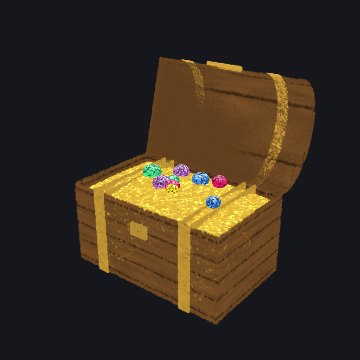
The Treasure Chest: its lid is a part on a hinge.
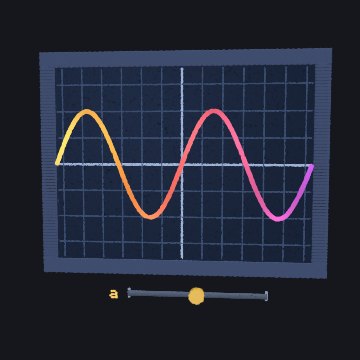
The Graph Plotter: the a slider is a control.
Behaviors
Some motion is too fine for parts: a flame that flickers, snow that falls, grass that sways.
A behavior moves each splat on its own on the graphics card:
kind: "flame", "twinkle", "sway",
"orbit", "fall", "wave", and more.
Morphs give each splat a second place,
to: (c) => [x, y, z], and slide it there as one of four channels goes from 0
to 1. Splat Equation's motion is made of morphs.
A small, complete recipe
Here is a whole Splash: a little windmill whose sails turn with a Wind slider, and a tap that blows a gust, spinning them once more around.
import { mix } from "../src/kit.js";

// A little windmill: a stone tower, a red cap, and four sails that turn in
// the wind. A tap blows a gust that spins them once more around.
export const RECIPES = {
  "little-windmill": {
    alive: true,
    options: [{ key: "sails", label: "Sail color", type: "color", default: "#f2eee4" }],
    controls: [
      { key: "wind", label: "Wind", type: "slider", default: 0.4 },
      { key: "gust", label: "Gust", type: "pulse", ease: 3 },
    ],
    action: { key: "gust", label: "Blow a gust" },
    drive(t, c, out) {
      // The wind turns the sails; a gust adds one extra turn, eased in and
      // out, so they end where they would have been anyway.
      const g = c.gust > 0 ? 1 - c.gust : 0;
      const extra = 2 * Math.PI * g * g * (3 - 2 * g);
      out.parts.sails = { angle: t * (0.3 + 2 * c.wind) + extra };
    },
    build(k, o) {
      // The tower: whitewashed stone, darker toward the ground.
      k.add(k.cone(0.5, 0.3, 1.6), {
        color: (c) => mix("#8b8f97", "#ece6d8", (c.p[1] + 0.8) / 1.6),
        interior: 0.1,
        core: "#6b5b4b",
      });
      // The cap.
      k.add(k.cone(0.36, 0.02, 0.4), { pos: [0, 1.0, 0], color: "#9c3b2c" });
      // The sails turn together, about an axis that points at you.
      const sails = k.part("sails", { pivot: [0, 0.6, 0.42], axis: [0, 0, 1] });
      k.add(k.sphere(0.07), { pos: [0, 0.6, 0.42], part: sails, color: "#4b3a2a" });
      for (let i = 0; i < 4; i++) {
        const a = (i * Math.PI) / 2;
        k.add(k.box(0.16, 0.9, 0.02), {
          pos: [-0.5 * Math.sin(a), 0.6 + 0.5 * Math.cos(a), 0.44],
          rot: [0, 0, (a * 180) / Math.PI],
          part: sails,
          color: o.sails,
        });
      }
    },
  },
};
This recipe, built by the kit.
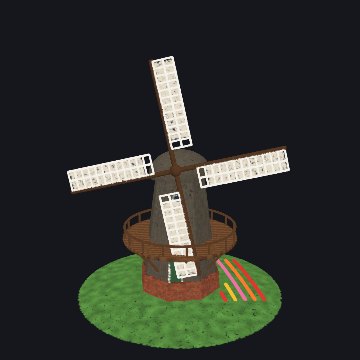
The Windmill on the shelf, a bigger Splash built the same way.
Read it from the bottom up. build adds a cone for the tower (its color a
function of height), a smaller cone for the cap, and a part called "sails" with a hub and
four boxes, each turned a quarter turn more than the last. drive turns the
sails part: steadily with the wind, plus one extra turn while the gust pulse runs, eased
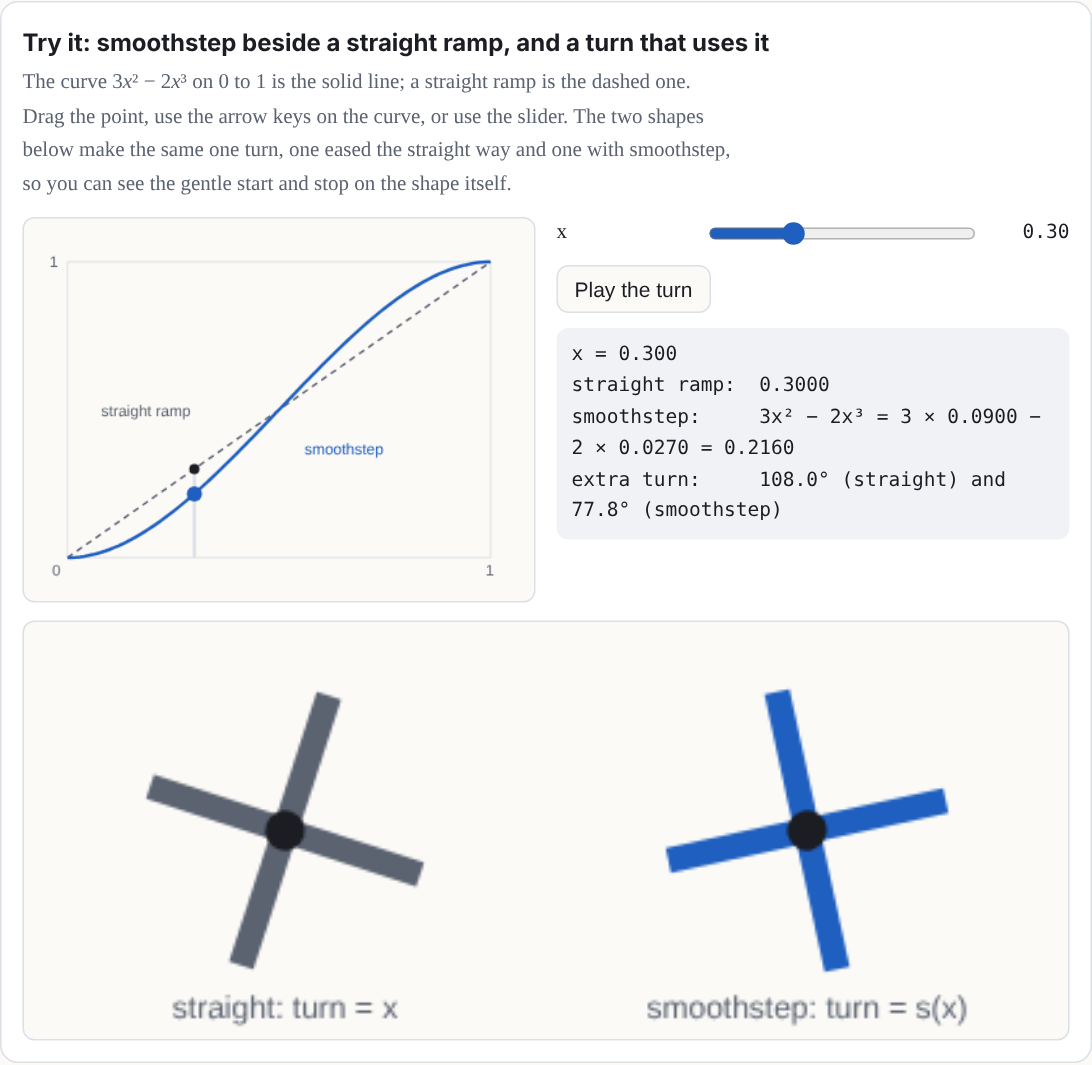
with the smoothstep curve
3g² − 2g³ (an S-shaped ramp that rises from 0 to 1 and is flat at both
ends [7]) so it starts and ends gently. A full extra
turn lands the sails where they would have been anyway, so nothing jumps when the gust ends.
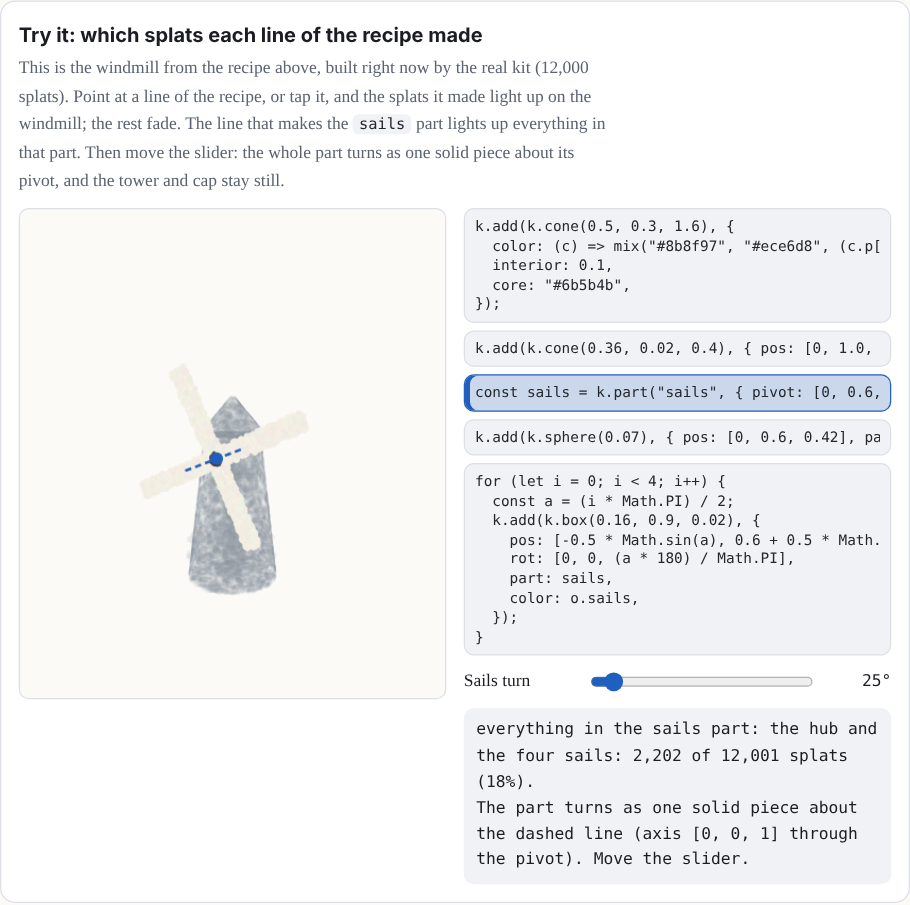
Try it: which splats each line of the recipe made
This is the windmill from the recipe above, built right now by the real kit (12,000
splats). Point at a line of the recipe, or tap it, and the splats it made light up on the
windmill; the rest fade. The line that makes the sails part lights up
everything in that part. Then move the slider: the whole part turns as one solid piece
about its pivot, and the tower and cap stay still.
Try it: smoothstep beside a straight ramp, and a turn that uses it
The curve 3x² − 2x³ on 0 to 1 is the solid line; a straight ramp is the dashed one. Drag the point, use the arrow keys on the curve, or use the slider. The two shapes below make the same one turn, one eased the straight way and one with smoothstep, so you can see the gentle start and stop on the shape itself.
Run it yourself
You can run the windmill on your own computer in five steps. You need a copy of the Splashery source (download it from GitHub) and Node.js.
-
Save the recipe as a pack. Copy the module above into
src/splashery/packs/little-windmill.js, or save this Manual's copy, example-recipe.js, there. Change its first line toimport { mix } from "../kit.js";. A pack lives insrc/splashery/packs/, so the kit is one folder up. (The Manual's copy says../src/kit.js, the path from where it sits on this site.) -
Add its catalog entry. In
src/splashery/toys.js, find the lineexport const TOYS = [and paste this right after it:
The{ id: "little-windmill", label: "Little Windmill", category: "objects", kind: "kit", pack: "little-windmill", // loads src/splashery/packs/little-windmill.js },idmust match the key in the pack'sRECIPES. Then add"little-windmill"toSYNCED_PACKSinsrc/splashery/synced-packs.js: a Splash opens only when its pack is listed there. -
Serve the folder. In the source folder, run
npm cionce, thennode tools/serve.mjs 4401 /splashery-experimental=.. The page needs a server because browsers will not load ES modules from a file address. -
Open the Splash. Go to
http://127.0.0.1:4401/splashery-experimental/?toy=little-windmill. The page opens a catalog Splash by its id. The windmill turns by itself. - Tap the windmill. The tap runs the recipe's action, the Blow a gust pulse: the sails spin one extra turn, easing in and out, and end where they would have been.
The same steps, in short. From inside your copy of the source folder:
1. Save the Manual's example-recipe.js as src/splashery/packs/little-windmill.js,
   and change its first line to: import { mix } from "../kit.js";
2. In src/splashery/toys.js, right after the line "export const TOYS = [", add:
   { id: "little-windmill", label: "Little Windmill", category: "objects", kind: "kit",
     pack: "little-windmill" },
   Then add "little-windmill" to SYNCED_PACKS in src/splashery/synced-packs.js.
3. Serve the folder: npm ci, then node tools/serve.mjs 4401 /splashery-experimental=.
4. Open http://127.0.0.1:4401/splashery-experimental/?toy=little-windmill: the sails
   turn by themselves, and a tap spins them one extra turn.
Steps to check: they follow the current source and will change with the public repository.
Splat Equation's text box takes equations (Chapter 3), not JavaScript recipes. A recipe
has to be a module in src/splashery/packs/, as above.